New Pasture
Lane
New Pasture
Lane
Computing
Curriculum Lead – Mr Coleman
Intent
At New Pasture Lane Primary School, our computing curriculum is designed to equip pupils with the knowledge, skills and understanding they need to thrive in an increasingly digital world. We deliver a broad, balanced and progressive curriculum that meets the requirements of the National Curriculum.
Our intent is to ensure that all pupils:
- Develop a secure understanding of computer systems and networks
- Become confident programmers who can think logically and solve problems
- Use technology creatively to design and produce digital content
- Understand how data can be collected, analysed and presented
- Learn how to use technology safely, responsibly and respectfully
We aim to nurture pupils who are inventive, resourceful and confident users of technology, with the skills needed for future learning and life beyond primary school.
Implementation
Our computing curriculum is carefully sequenced and builds knowledge and skills progressively from the Foundation Stage through to Year 6. Pupils will develop their knowledge of computing through the three strands of computer science, information technology and digital literacy. Within these three main strands are the Key Concepts or 'Big Ideas' that children return to and revisit as they progress through the school. They will have opportunities to link new learning to prior knowledge within a key concept to build a rich and deep knowledge of the big ideas in computing.
Below explains the key concepts within each of the three main strands:
COMPUTER SCIENCE:
This focuses on programming & algorithms and data & information. This will provide pupils with the foundational knowledge needed to understand the rest of the curriculum.
Key concepts:
- Programming
- Data and information
INFORMATION TECHNOLOGY:
Studying this aspect will give children the knowledge of how computers are used in society. They will also explore how computers are used to create digital artefacts such as videos, animations or 3D models.
Key concepts:
- Computer systems and networks
- Creating media
DIGITAL LITERACY:
This is woven through the key concepts above. Pupils will learn how to…
- operate devices
- search and select information
- use digital devices safely and responsibly
From the early years, pupils develop foundational digital and coding skills, which are revisited and extended as they move through the school. Lessons combine practical, hands-on experiences with opportunities for discussion, problem-solving and reflection.
Computing is taught weekly across all year groups using the Kapow Primary Computing scheme and equip pupils with the knowledge to become creators of digital technologies and digital artefacts.
Computing skills are also applied across the wider curriculum, enabling pupils to use digital tools such as media creation software, green screening and interactive presentations to enhance learning in other subjects.
Assessment is ongoing and formative. Teachers use Kapow’s assessment materials alongside observations and outcomes from lessons to monitor progress and inform future teaching, ensuring pupils are both supported and challenged appropriately.
Impact
As a result of our computing curriculum, pupils leave New Pasture Lane Primary School as confident, capable and responsible users of technology. They:
- Demonstrate a secure understanding of how technology works
- Apply logical thinking and problem-solving skills through programming
- Create purposeful and creative digital content
- Use data effectively to support learning
- Understand how to stay safe online and act responsibly in digital environments
Pupils are well prepared for the next stage of their education, with the digital literacy and computational thinking skills needed to succeed in a rapidly changing technological world.
Long Term Plan
|
Autumn |
Spring |
Summer |
|
|
FS
|
Exploring technology in play; using iPads for drawing and games; safe use of technology.
|
Early coding with simple programmable toys; creating digital stories and pictures. |
Using apps to support learning (letters, numbers, shapes); reinforcing online safety. |
|
Y1 |
Programming with Bee-Bots (simple sequences); basic ICT skills. |
Creating media – digital painting and simple e-books. |
Data handling – sorting/grouping information; online safety: keeping information safe. |
|
Y2 |
Programming with ScratchJr (algorithms and debugging). |
Creating media – digital music and photography. |
Data handling – presenting data in charts; online safety: safe searching and reliability. |
|
Y3 |
Programming – sequencing and animations with Scratch. |
Computer systems – how digital devices work together; online safety: recognising risks |
Creating media – stop-frame animation; data handling – branching databases. |
|
Y4
|
Programming – designing and debugging programs in Scratch.
|
Computer systems – understanding the internet; online safety: respectful communication. |
Creating media – audio production and photo editing; data handling – spreadsheets. |
|
Y5 |
Programming with Scratch and Micro:bit (selection and variables). |
Computer systems – search engines and how the web works; online safety: online reputation. |
Creating media – web design and 3D modelling; data handling – spreadsheets for problem solving. |
|
Y6 |
Programming – advanced Scratch/Python simulations. |
Computer systems – how data is transferred online; online safety: digital footprints and privacy. |
Creating media – web design and 3D modelling; data handling – spreadsheets for problem solving. |
Story Sacks
Using a group of core apps, children create a ‘Story Sack‘ based on knowledge and experiences from across the curriculum. This is then uploaded to our School app allowing parents to share their child’s multi-media work completed in school.
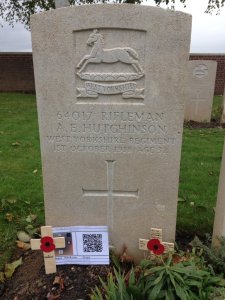
A Story Sack created by Y5 linked to the #everynameneedsastory project of one of the many Bridlington men who never returned during WW1, placed next to his headstone on the Somme.
Diar's Story was a short animation created by Diar alongside his fellow Y5 pupils about his journey from Syria to the UK.